Blog · · Announcement
The Practice Planner: what to practice today, and how it's going
In September, about 140 of you answered a survey about where Fret Science should go next. When I asked what I should make more of, practice tools came out on top, just ahead of new courses. And when I asked what was holding you back, about one answer in five wasn't about content at all. It was about structure: no routine, not practicing the things you know you need to practice, not knowing where to start.
Two of those answers stuck with me. One member had tried a practice app and found that once the list grew, it got hard to tell whether they were making progress. Another wanted some way to know when they were done with something, so they could move on. The Practice Planner is my answer to both. It’s open to all paid subscribers now, and this post is about why it works the way it does. The guides cover how to use it.
A list that knows what's due
You keep a list of the exact things you're working on. That might be one exercise from a course, the metronome at the tempo you're pushing, a jam track looped on the four bars that keep tripping you up, or a page in a book your teacher assigned. Every lesson and practice tool on the site has an Add to practice button, so most items take one tap.
Each day, Today shows what's due. Start a session, and the planner takes you from item to item, opening each one's own page with a bar across the top for the clock and your rating. Play, rate how it went, tap Next.
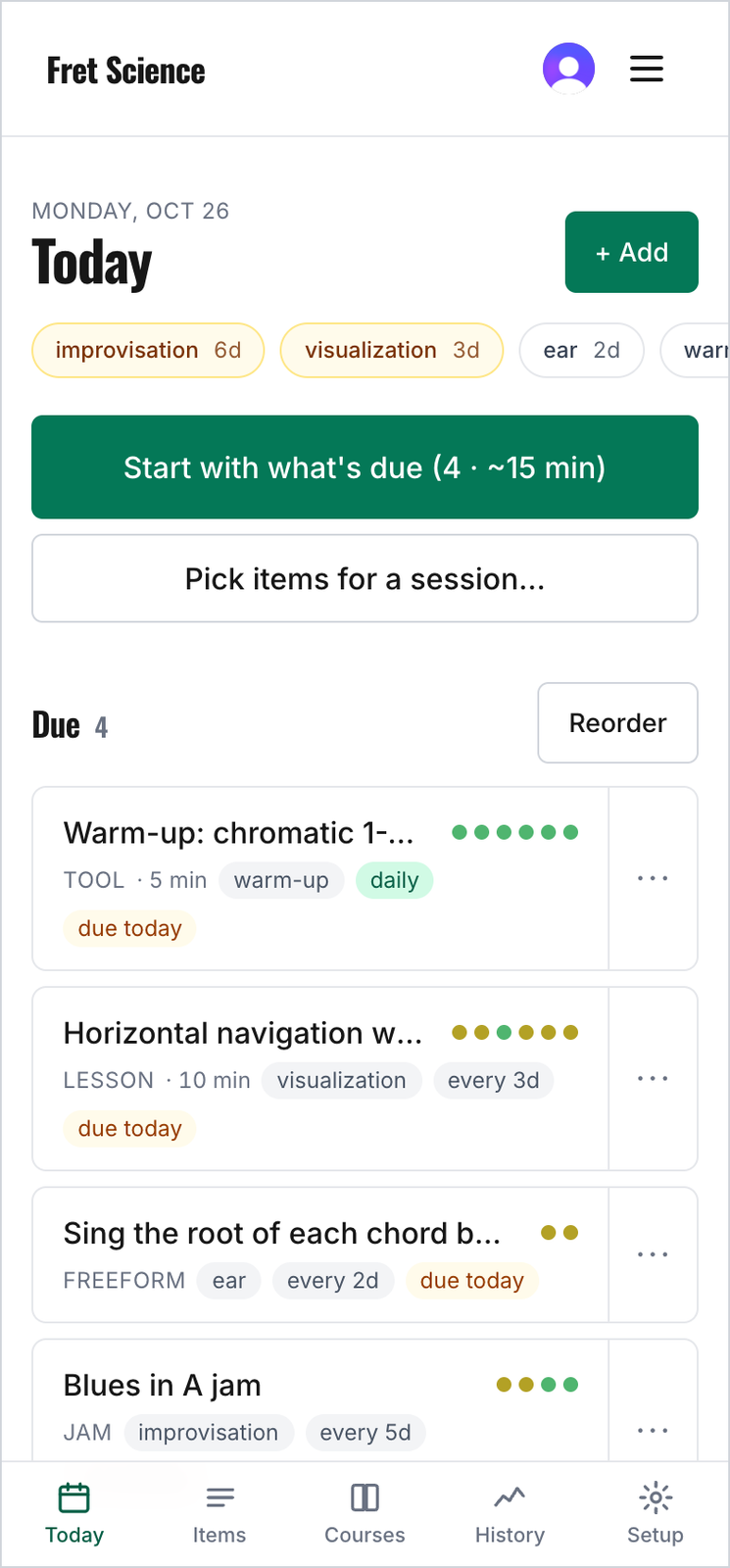
Today, on a phone. The chips across the top are your areas and how long it's been since you practiced each one.
Why it schedules things the way it does
The ratings drive everything. There are five, from Rough to Clean & fluid. Rate an item Rough, and the gap before it comes back is cut in half. Rate it Clean & fluid, and the gap grows by more than half. The things you're struggling with show up often, and the things you've already got under your fingers drop back to an occasional check-in instead of taking a slot every day.
That's spaced practice, one of the ideas Molly Gebrian writes about in Learn Faster, Perform Better: the same amount of practice, spread over more days, sticks better than the same time crammed into one sitting. Flashcard apps run on the same principle, but a flashcard is either remembered or forgotten. A guitar skill isn't. It gets steadier, faster, and more automatic by degrees, which is why the planner asks how it went instead of whether you did it.
It also watches the balance between the different parts of your playing. You can file each item under an area, such as visualization, technique, ear, or improvisation, and when an area has gone a week without practice, its items move up the list.
Seeing it improve
The other half of what you asked for was a way to see progress. Each time you log an item, the planner keeps your rating, your tempo, how long you played, and a note if you write one. Each item charts them over the weeks, so "am I getting anywhere with this?" has an answer you can look at.
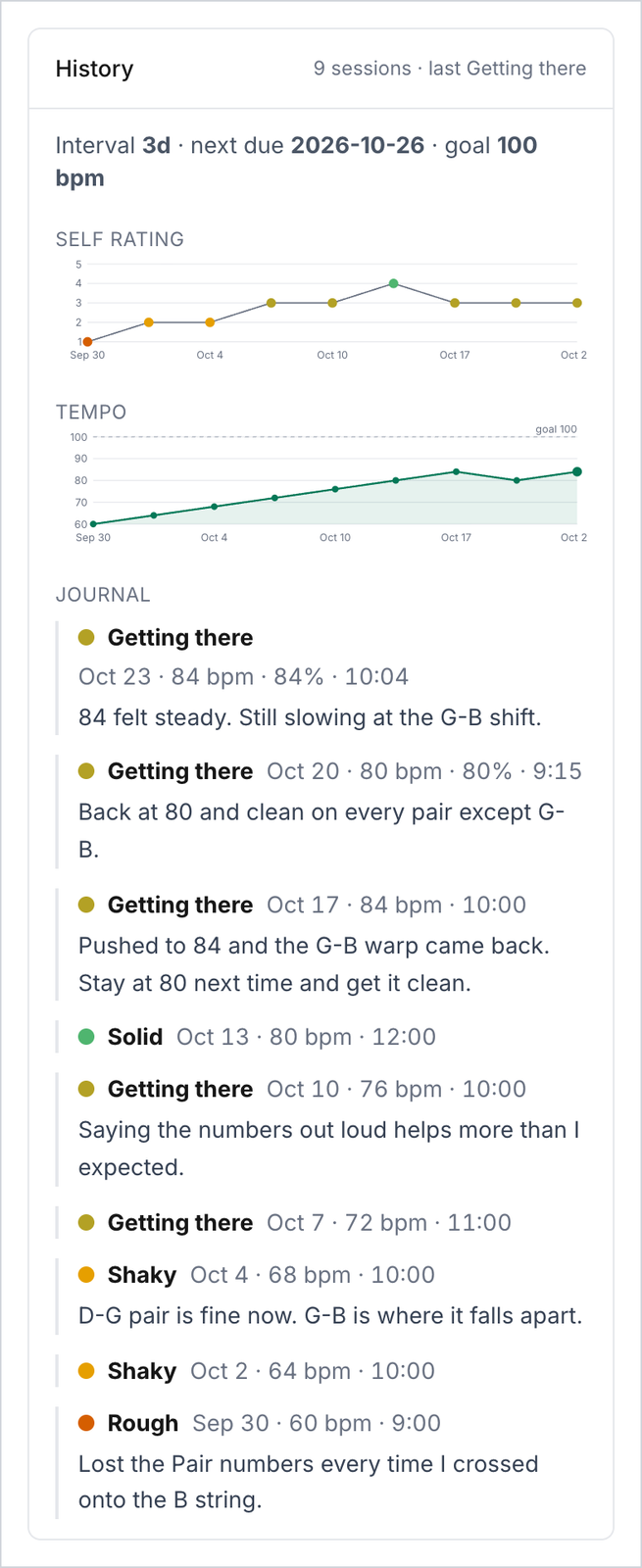
One exercise over three weeks: the ratings, the tempo climbing toward the goal, and the notes along the way.
For the courses, the Courses tab lists every exercise in Improv 101 and Complete Scale Fluency, shows which ones you've practiced and how many you've rated Solid or better, and names the next exercise in the course.
Built into the courses
The planner works best with the courses. Add an exercise, and when it comes up in a session, the planner opens the lesson at that exercise, with the practice bar across the top. Most course exercises now have a line called Today's version under them. It picks a key, a string, or a shape for you and links to the tool that plays it, already set up. An exercise in your planner changes to a new version each day on its own, so you get the variety the exercise was written for without having to choose.
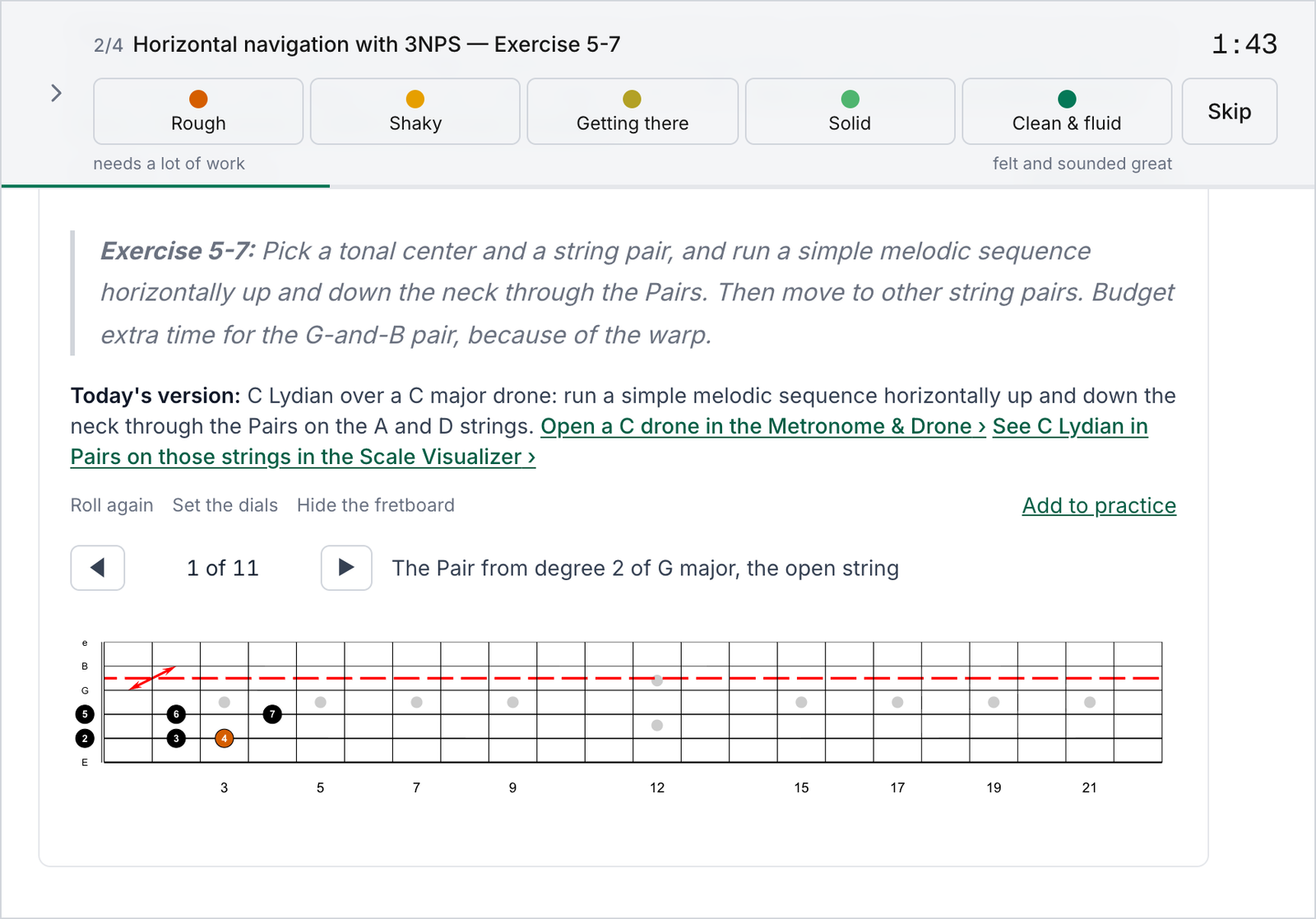
A Complete Scale Fluency exercise during a session. The bar holds the clock and the five ratings. Below the exercise, Today's version picks C Lydian on the A and D strings, links to the tools that play it, and draws it on the fretboard.
Shaped by twenty testers
About twenty members have been using the planner since late September, and a lot of what's in it now came from them. One tester kept the Course Guide open beside every practice item, so now each lesson item links straight to its section of the guide. Another wanted to choose the order of what's due, so you can now arrange it yourself. A few people stalled at an empty list, not sure what to add first. That's where the starter sets came from: one tap puts three exercises from the first lessons of Improv 101 or Complete Scale Fluency on your list, already scheduled. Thank you to everyone who wrote in.
I've practiced with it myself since the first version went up in September. I do most of a session on my laptop and the Timing Game on my phone, and the session follows me from one to the other.
Getting started
The planner is included with Silver, Gold, and Platinum memberships, and it's already in your menu under Practice. The two-minute quick start gets you through your first session, and the full guide covers everything else. If you're on another tier, the planner's page shows what it does and how to get it.
I recommend starting with three to five things and using it for a week. If something gets in your way, leave a comment below or use the Feedback button on any page of the site.
Tagged: practice, practice planner, tools
Follow along by email
The newsletter goes out every other Tuesday with what's new at Fret Science, the occasional deal, and a roundup of recent blog posts. Unsubscribe anytime.
Prefer a feed reader? Follow the blog by RSS
Discussion
Sign in or create a free account to join the discussion.
No comments yet — be the first to start the conversation.