Blog · · Announcement
The Timing Game: a score for your sense of time
Last year I read Molly Gebrian's book Learn Faster, Perform Better, and one idea in it immediately changed how I practice with a metronome. When the click sounds on every beat, the metronome is keeping time for you. Your own sense of the pulse never has to do the work, so it never gets stronger. The fix is to take beats away. Set the metronome to drop clicks at random, and you have to carry the pulse through the gaps, while the clicks that remain tell you whether you held it.
I made a video about it called Your Metronome Is Holding You Back, and this summer I got to talk it through with Molly herself in Stuck in the Box 10. She gets to the metronome about half an hour in. This site's metronome has had a dropout setting since it launched.
The problem: you can't see your time getting better
Practicing with dropout works. The hard part is knowing that it's working, because internal time is so hard to measure. You can tell when a session felt good. You can't tell whether you're any steadier than you were three months ago, or whether the last few weeks of practice paid off. Most of us find out how good our time really is on a gig, with a band, which is a bad moment to learn it.
The Timing Game is my attempt to fix that. It's the dropout exercise with a score attached. You tap along with the click, the clicks start dropping out, and the game measures how close every tap lands to the beat. That comes down to one number: tightness, in milliseconds. Smaller means steadier, and a beat you miss entirely counts against it. Every session is saved, and the progress page shows whether the number is coming down.
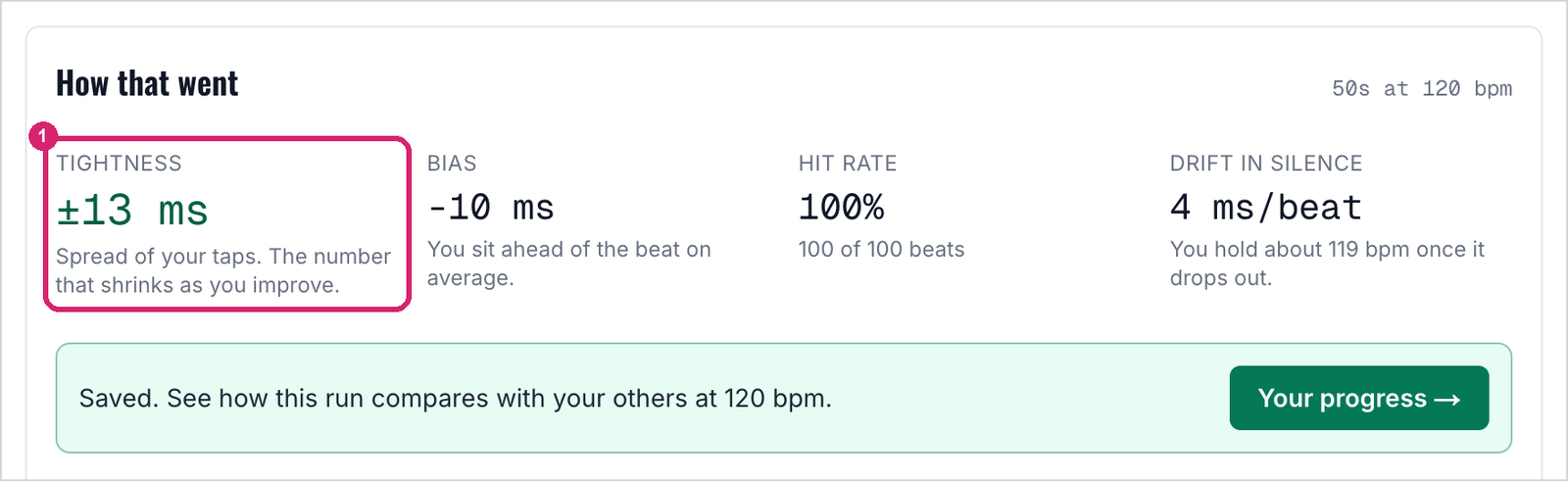
The summary after a run. ① Tightness, the number to watch from one session to the next.
How to play
- Start by opening the game at 120 bpm with 30% of clicks dropped. This link sets both for you.
- Press Start game and tap along on the space bar, or on the screen if you're on a phone. The first eight taps measure your device's audio delay, so Bluetooth headphones and slow speakers don't count against you.
- Keep tapping as the clicks drop out. When the run ends, check your tightness.
- Once that feels easy, make it harder one step at a time, with more clicks dropped or a slower tempo. Slower is harder, because longer gaps give your pulse more room to wander. When your tightness gets clearly worse, you've found your edge, and that's the place to practice.
Watching it improve
The game keeps track of your progress over time. Its progress page charts your tightness session by session for each set of settings you've played, with a trend line through the results. It also summarizes every tempo you've tried, with your recent form next to your best, so you can see at a glance where your time holds up and where it starts to slip.
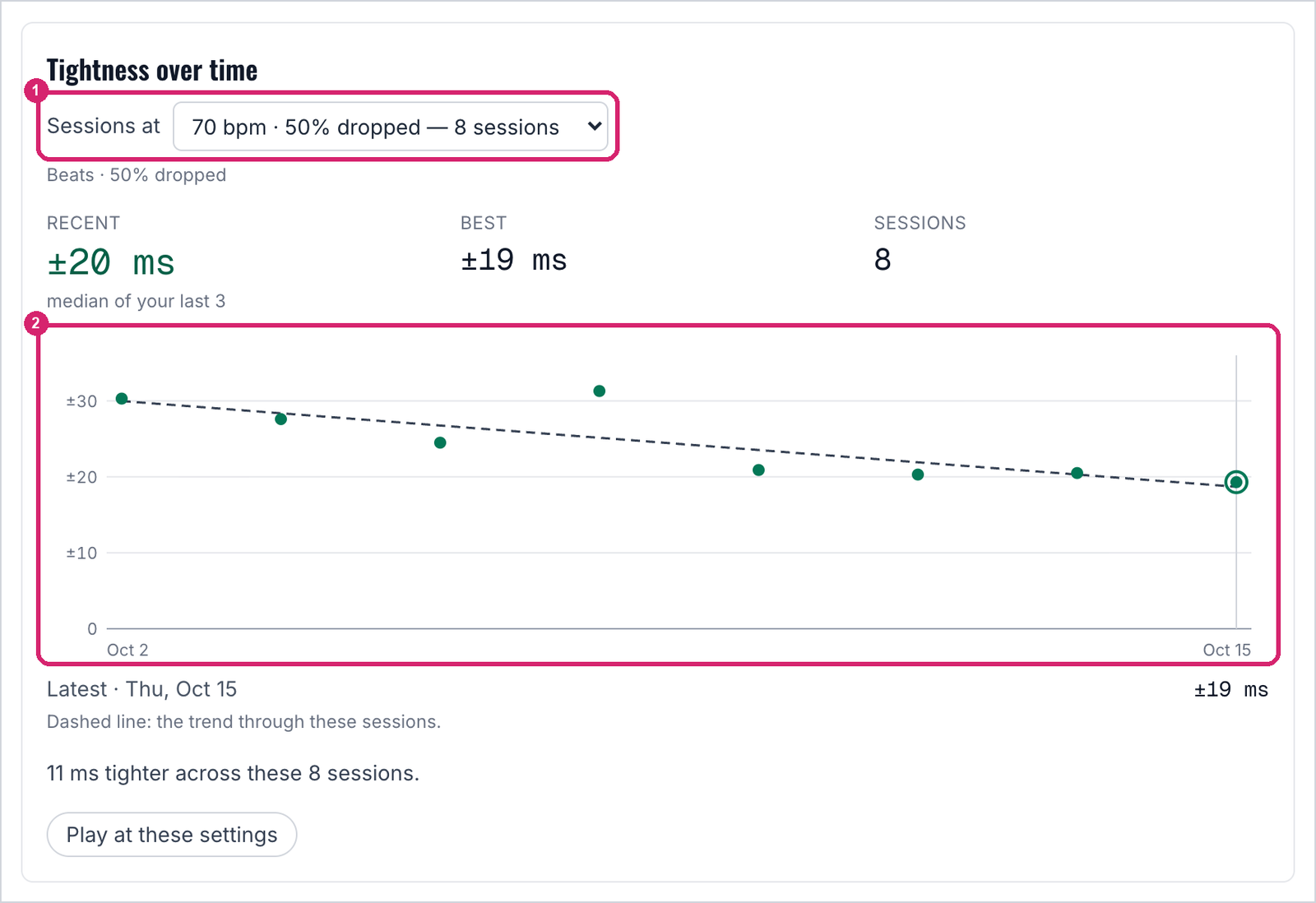
An example from the progress page. ① The settings being charted. ② One dot per session. Single runs bounce around, so the dashed trend line is the thing to watch.
The getting-started guide goes through it in more detail, with screenshots.
Thanks to the patrons who tested the game over the past month. Their reports shaped the version that's live now.
The full game, with saved sessions and the progress page, is open to Silver patrons and up. Anyone can play a preview round at 120 bpm with 30% of the clicks dropped and see how it scores.
Tagged: timing, practice, tools
Follow along by email
The newsletter goes out every other Tuesday with what's new at Fret Science, the occasional deal, and a roundup of recent blog posts. Unsubscribe anytime.
Prefer a feed reader? Follow the blog by RSS
Discussion
Sign in or create a free account to join the discussion.
No comments yet — be the first to start the conversation.